
Same experience. A résumé that shows it.

Screeners look for task types, domain, and standards. RaterSidekick shows where your résumé undersells the work you've done and suggests clearer wording.

  • Free to try
  • PDF or DOCX
  • Your original stays as it is
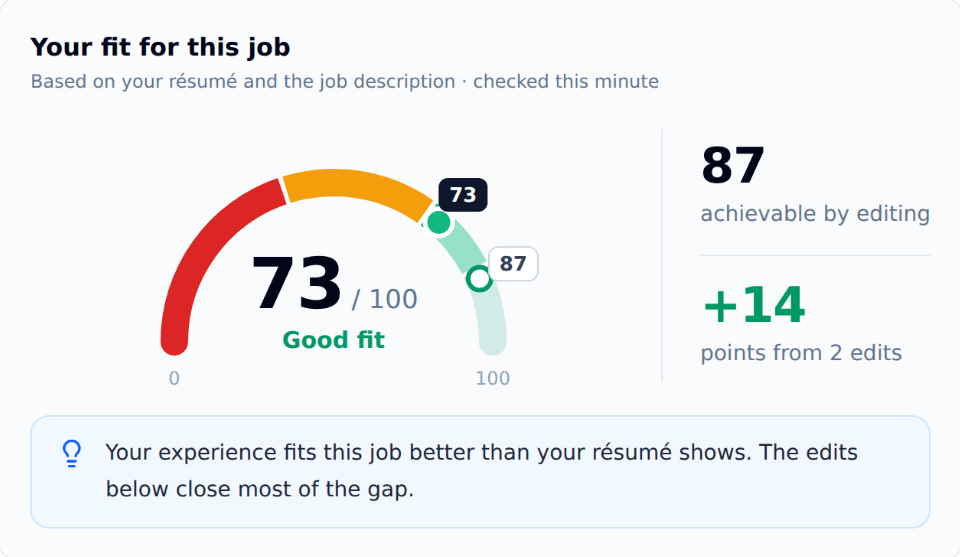
RaterSidekick fit check: a résumé scores 73 out of 100 for an AI training listing, with 87 achievable by editing and 14 points from 2 edits.

Example from our résumé guide

Before

Worked on AI projects for several platforms

After

Evaluated 900+ AI-generated responses for accuracy and instruction-following across five projects since March 2025

  • The work
  • The standard
  • Scope from your records
  • Check your résumé against the listing before you apply.

Upload your CV and paste a job listing. See what your résumé already shows, what isn't clear yet, and what editing can't add. Then make a tailored copy for that listing.

  1. 01

    Upload your CV

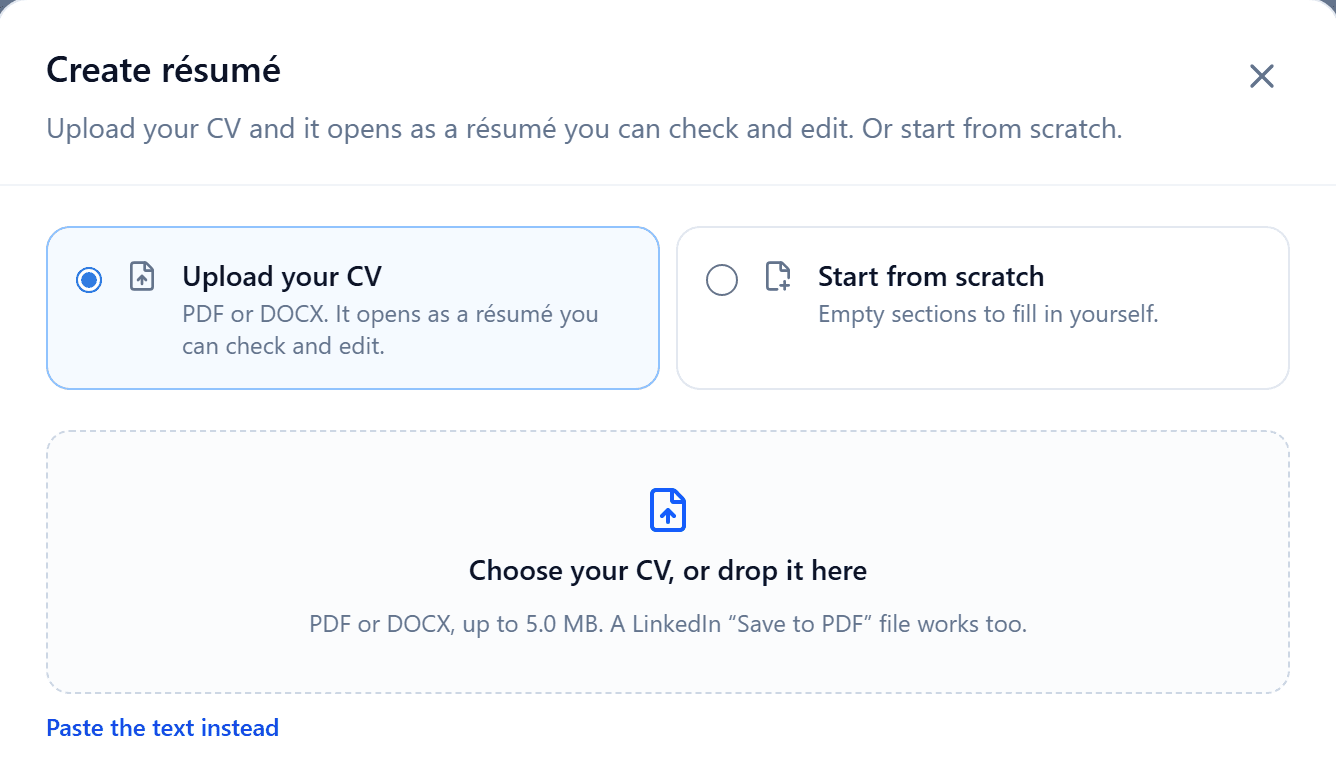
    PDF or DOCX, or start from scratch. It opens as a résumé you can check and edit.

    Create résumé in RaterSidekick: upload your CV as a PDF or DOCX, or start from scratch.
  2. 02

    Paste a listing and check your fit

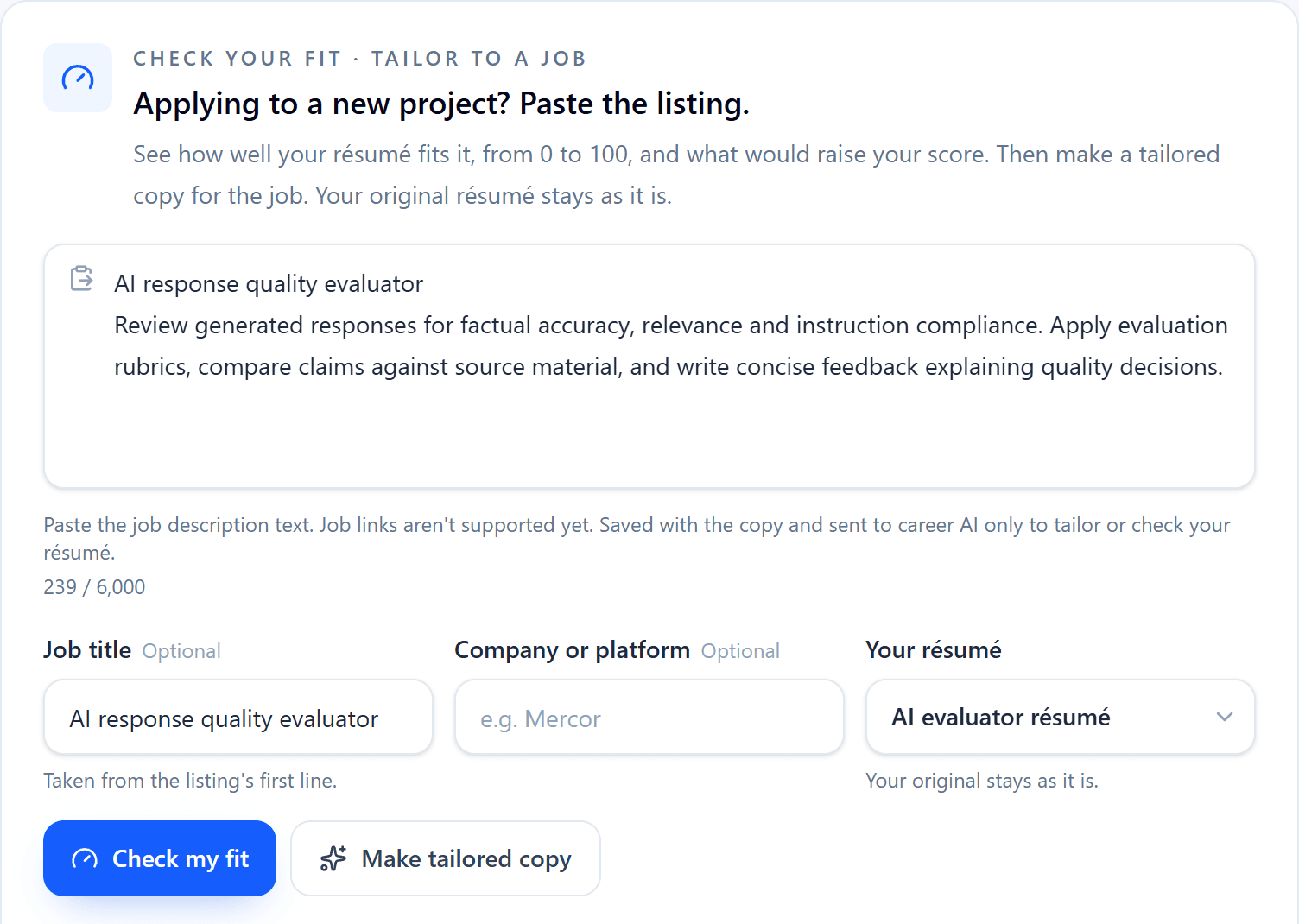
    See your score, what editing could reach, and the suggestions worth the most points. Checking changes nothing.

    RaterSidekick's check your fit card with a pasted AI training listing, the chosen résumé, and the Check my fit and Make tailored copy buttons.
  3. 03

    Make a tailored copy

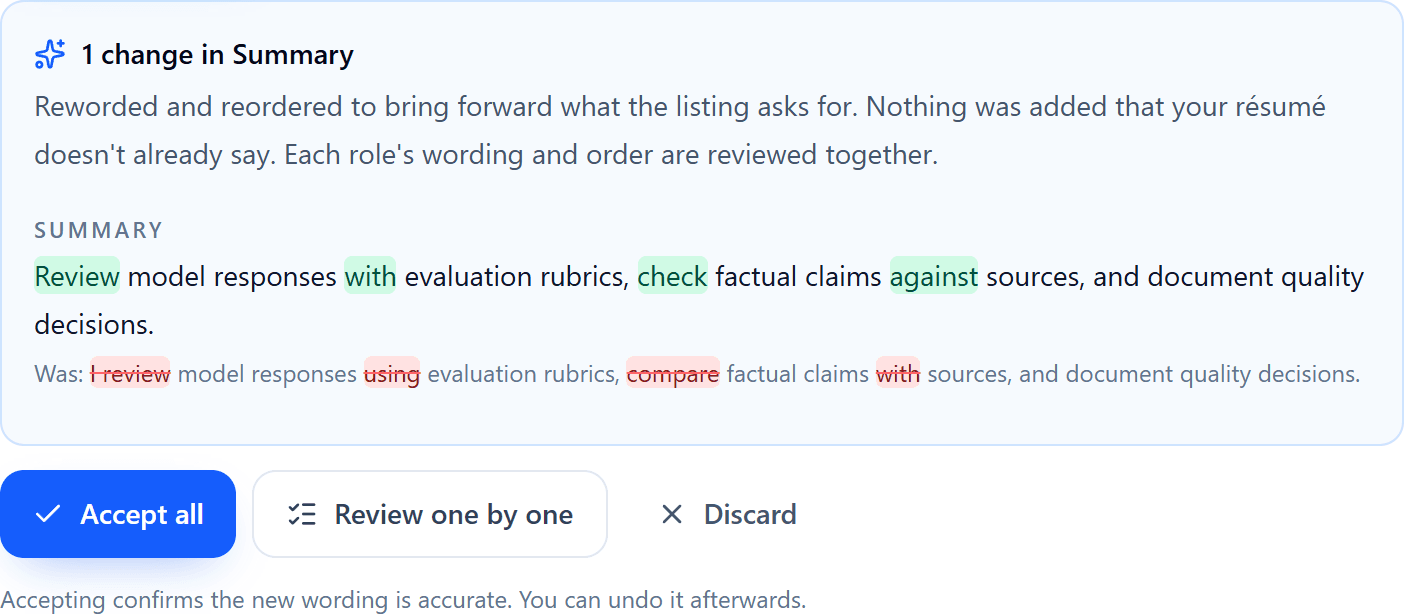
    Review each suggested change, keep what's accurate, and download it as PDF or DOCX.

    RaterSidekick's tailored-copy review showing a suggested summary change, highlighted additions and removals, and Accept all, Review one by one and Discard buttons.

What your résumé shows, and what it doesn't yet.

Already shows

Requirements from the listing that your résumé already covers.

Not clear yet

Experience you have that your résumé doesn't show clearly, with the points each edit is worth.

Can't add by editing

Required qualifications editing can't add, such as a degree or license you don't hold.

Say what you did, to what standard, and how much.

Weak bullets usually leave out the task type or the standard you applied. Name both, then add scope your records support.

  • The work
  • The standard
  • Scope from your records
  • Before: Rated chatbot answers

    After: Compared paired model responses and wrote rationales explaining which better met the user's request

  • Before: Did fact-checking

    After: Verified claims in model responses against reliable sources and flagged unsupported or outdated statements

  • Before: Checked other people's work

    After: Reviewed peer submissions for guideline compliance and gave contributors written feedback

Then add scope your records support, such as “across 400+ tasks since March 2025”.

Back it up with your work record.

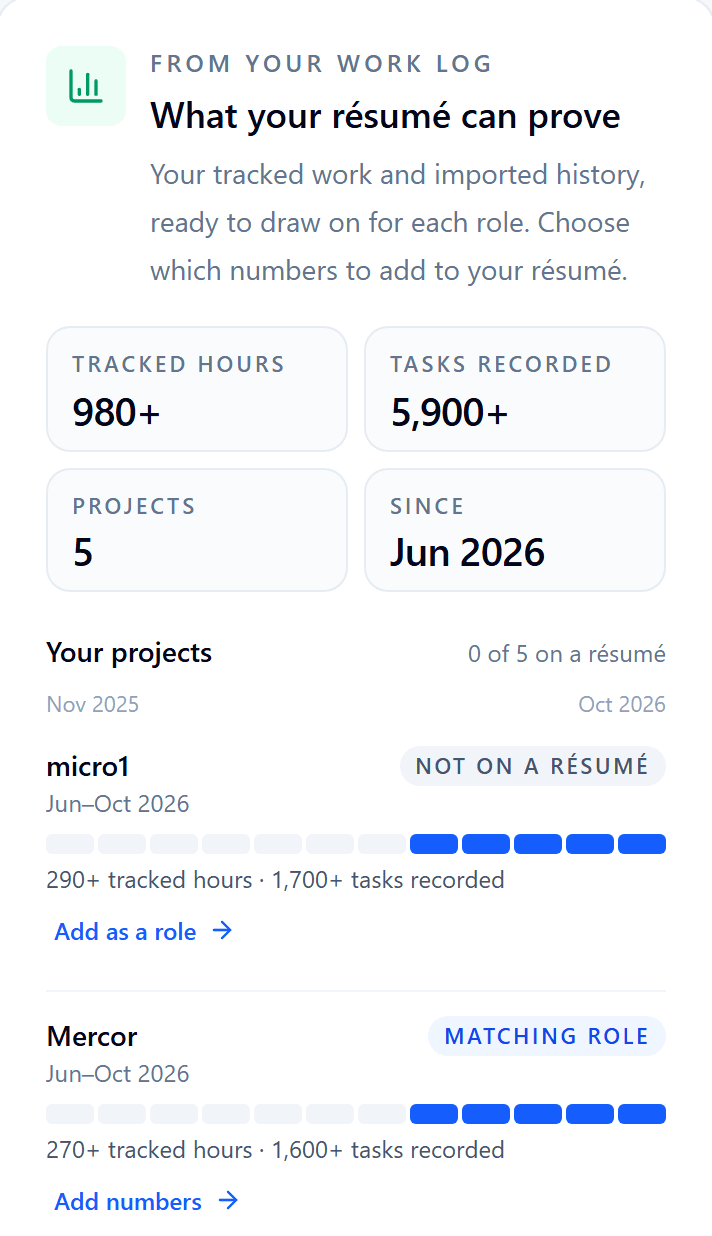
Your tracked hours, tasks recorded, and projects, rounded down and ready to add to each role. Record new work with the optional Chrome extension, or import the reports you already keep.

Included with RaterSidekick Pro.

See how RaterSidekick keeps your record ->
What your résumé can prove: tracked hours, tasks recorded, and projects from the Work Log, with per-project totals ready to add to a role.

Three résumé examples for AI training work.

A generalist, a subject specialist, and a coding evaluator. The people, dates, and numbers are made up. Use your own, and only numbers your records support.

Read the full guide ->

Generalist writing evaluator

Example

AI Trainer | Writing Evaluation and Editing

Summary: Former high school English teacher with 18 months of contract AI training. Evaluate and rewrite AI-generated responses for accuracy, instruction-following, and tone, with a written rationale for every rating.

AI Trainer (Contract, part-time, remote)

DataAnnotation and Outlier · Mar 2025 to Present

  • Evaluated AI-generated responses for factual accuracy, instruction-following, and clarity, documenting each rating against project rubrics
  • Compared paired responses and wrote rationales explaining which better answered the user's request
  • Completed 1,100+ evaluation tasks across six projects since March 2025

Why it works

Each bullet names a task type and a standard. The scope line comes from a work record.

Subject specialist

Example

Molecular Biologist | AI Trainer, Biology Expert

Summary: PhD candidate in molecular biology with nine months of contract AI training. Write graduate-level biology prompts and evaluate model responses for scientific accuracy, completeness, and depth.

AI Trainer, Biology Expert (Contract, remote)

Handshake AI Fellowship · Jan 2026 to Present

  • Wrote graduate-level prompts in genetics and cell biology designed to expose reasoning errors in large language model (LLM) responses
  • Evaluated model answers for scientific accuracy and depth, citing primary literature in written rationales
  • Logged 240+ hours across four projects

Why it works

Subject expertise leads. Hours describe expert work better than task counts.

Coding evaluator

Example

Software Engineer | AI Code Evaluation

Summary: Backend engineer with six years of Python and TypeScript experience and 18 months of contract AI training. Evaluate model-generated code for correctness, efficiency, and readability.

AI Code Evaluator (Contract, remote)

Mercor · Mar 2025 to Present

  • Evaluated AI-generated Python and TypeScript solutions for correctness, edge-case handling, efficiency, and readability against project rubrics
  • Wrote and ran unit tests to verify model outputs, documenting each failure with a reproducible example
  • Completed 650+ code evaluations across three projects

Why it works

It reads like a code reviewer's résumé, and the count comes with its task type.

  • Scope from your records

RaterSidekick is independent and isn't affiliated with the platforms named in these examples.

Common questions

Yes. Résumé tools are included in the same 7-day RaterSidekick Pro trial as the dashboard. Trial terms: 7 days · no card required. Your trial ends after 7 days. Subscribe only if you want to continue. A daily AI allowance applies.

A CV as a PDF or DOCX file, up to 5 MB. A LinkedIn “Save to PDF” file works too. You can also paste the text or start from scratch.

No. Checking your fit changes nothing, and a tailored copy is saved as a separate résumé. You choose which suggested changes to keep.

No. A CV and a listing are enough. The extension is optional: if you track your work with it, the fit check can also read your rounded-down tracked hours and task counts, with your permission. Imported history isn't read automatically, but you can add those numbers to your résumé yourself.

Your CV and the listings you paste are sent to career AI to check or tailor your résumé. You can turn off career AI and erase your career data at any time in Résumé & Career.

Same experience. A résumé that shows it.

Paste your next listing and see what your résumé already shows.

Free to try · PDF or DOCX · Your original stays as it is

RaterSidekick

A private record of your AI contract work, across the platforms you choose.

Featured on tinyshelf

All AI training company, platform, product, and service names mentioned are trademarks or registered trademarks of their respective owners. RaterSidekick is an independent tool and is not affiliated with, endorsed by, sponsored by, or certified by any AI training company or platform.

© 2026 RaterSidekick. All rights reserved.